
Introduction
Artificial intelligence in game development means using software that can learn, decide, or generate content to build and run games. It covers classic game AI, like enemy behavior and pathfinding, and newer tools, like generative AI for art, code, dialogue, and testing. The safest way to start is with low-risk uses such as research, prototyping, testing, and analytics, with humans reviewing everything players see.
Developers are split on it. In GDC's November 2026 survey, 40% of game industry professionals said they use generative AI at work, yet 55% said it's hurting the industry. So who's right? This guide explains how AI in game development really works, where it helps, where it causes trouble, and how to use it wisely.
What Is Artificial Intelligence in Game Development?
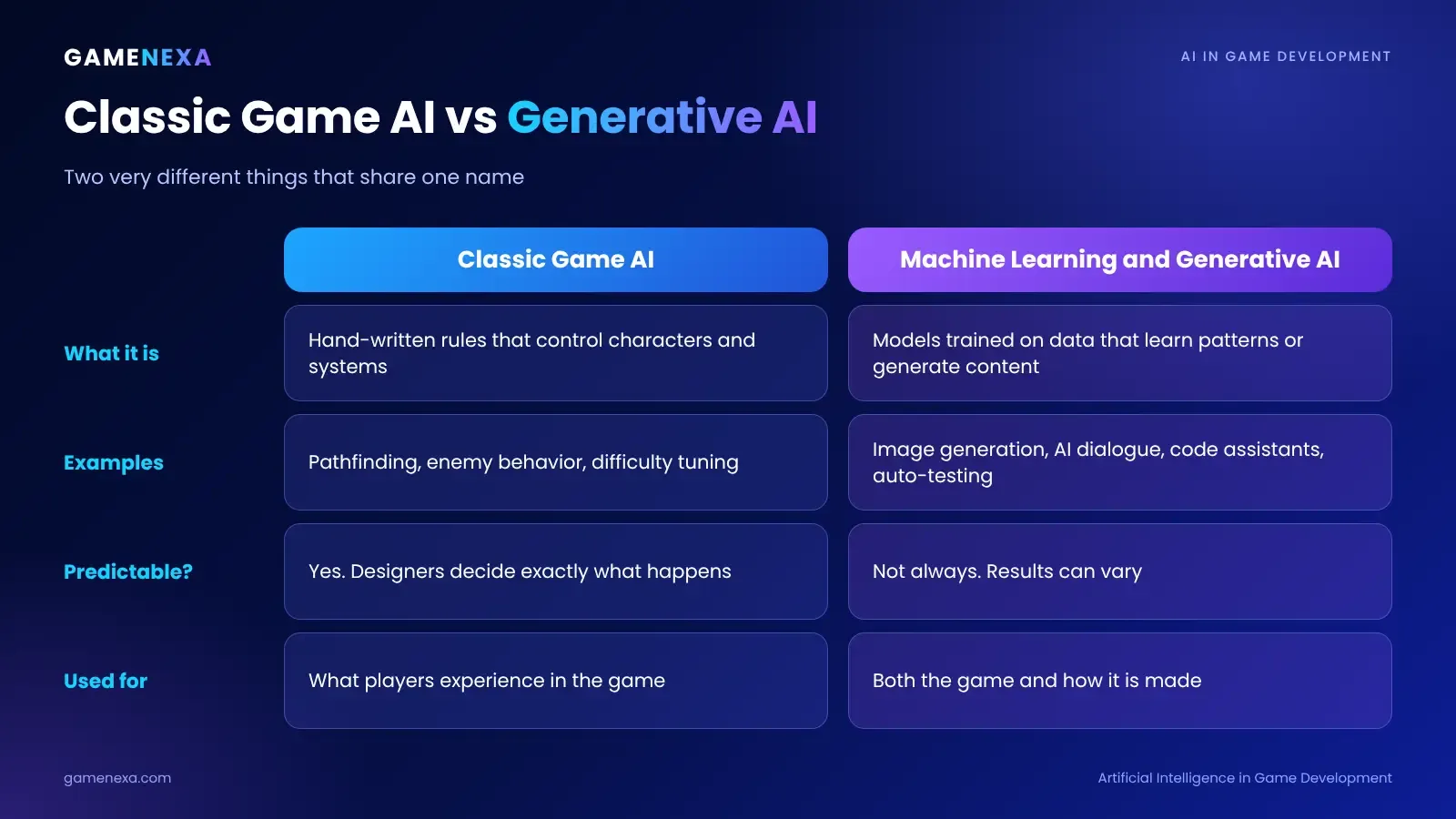
The phrase covers two very different things. Mixing them up causes a lot of confusion.
Classic game AI | Machine learning and generative AI | |
|---|---|---|
What it is | Hand-written rules that control characters and systems | Models trained on data that learn patterns or generate new content |
Examples | Pathfinding, enemy behavior, difficulty tuning | Image generation, AI dialogue, code assistants, automated testing |
Predictable? | Yes. Designers decide exactly what happens | Not always. Results can vary |
Used for | What players experience in the game | Both the game itself and the way it's made |
Age | Decades old | Mainly the last few years |
Both matter. Classic game AI makes a game feel alive. Generative AI changes how teams build it. Most modern projects use a mix.
Where AI Is Used in Game Development
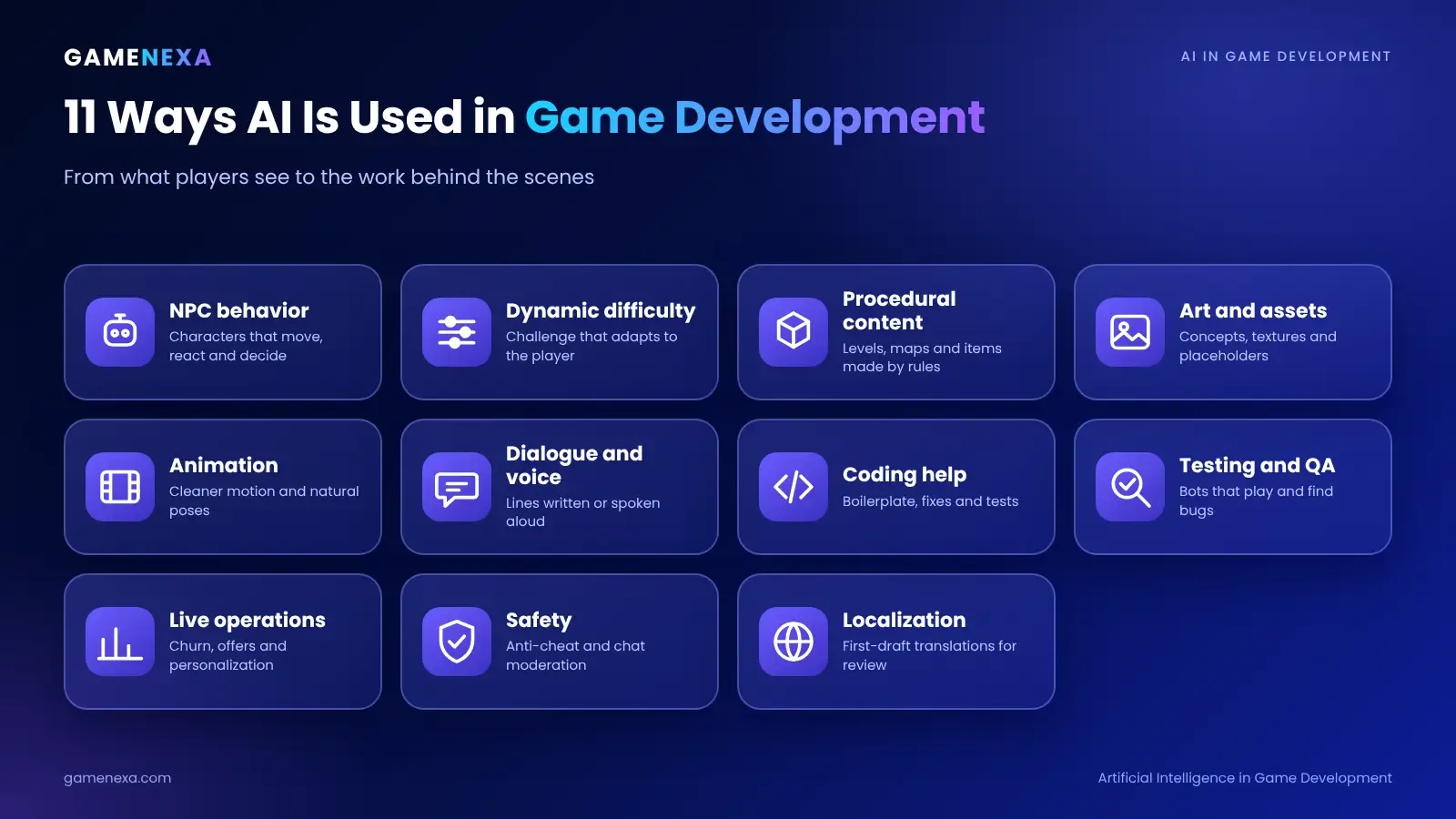
Here are the main areas, from the part players see to the work behind the scenes.
Use case | What AI does | Example |
|---|---|---|
NPC behavior | Controls how characters move, react, and make decisions | Enemies that flank, take cover, or retreat |
Dynamic difficulty | Adjusts challenge to the player's skill | Fewer enemies after repeated losses |
Procedural content | Generates levels, maps, and items | Random dungeons, terrain and loot |
Art and assets | Creates concept art, textures, and 3D models | Quick mood boards and texture variations |
Animation | Cleans up motion data and helps pose characters | Smoother walk cycles and natural movement |
Dialogue and voice | Writes lines or speaks them aloud | NPCs that respond to what players say |
Coding help | Suggests code, finds bugs, and writes tests | Faster scripting for common tasks |
Testing and QA | Plays the game automatically to find problems | Bots that test every level overnight |
Live operations | Predicts player behavior and personalizes offers | Spotting players likely to quit |
Safety | Detects cheating, fraud, and toxic chat | Bot detection and chat moderation |
Localization | Translates text and checks it for errors | First-draft translations for human review |
Not every use is equal. Some are low-risk and widely accepted, and others raise real legal and ethical questions. We'll cover that below.
1. AI for NPCs and Game Behavior
This is the oldest and most familiar use of game AI.
Classic techniques
Pathfinding. Algorithms like A* help characters find a route around obstacles. Most 3D games use navigation meshes to define where characters can walk.
Finite state machines. A character switches between states like patrol, chase, and attack based on simple rules.
Behavior trees. A more flexible way to organize decisions, popular in action and strategy games.
Utility AI. Characters score their options and pick the best one, which makes behavior feel more natural.
These methods are fast, predictable, and easy to debug, which is why they're still the backbone of most games.
The new frontier: AI-powered NPCs
Some studios are testing NPCs that use large language models to hold open-ended conversations. A shopkeeper could answer questions you didn't expect, or a companion could comment on what's happening.
It's exciting, but it has real challenges:
Consistency. The NPC must stay in character and match your story world.
Safety. Open-ended text can produce offensive or off-topic responses without guardrails.
Cost and speed. Each response uses computing power and takes time. That matters on mobile.
Control. Designers need to keep important story beats on track.
Most teams use a hybrid approach: a scripted core for key story moments, with generative responses for flavor. Treat fully open-ended NPCs as an experiment, not a default.
2. Procedural Content Generation
Procedural content generation, or PCG, uses rules and algorithms to create content automatically. It has been used for decades in games with randomly generated worlds, dungeons, and items.
Why teams use it:
Huge amounts of content from a small team
Replayability, because every run feels different
Faster prototyping of levels and worlds
What to watch for: Random isn't the same as good. The best procedural games use careful design rules so levels stay fun, fair, and beatable. Machine learning can now help by learning from hand-made levels, but a designer still needs to check the results.
3. Generative AI for Art, Animation and Audio
This is the most debated area of AI in game development.
How teams use it:
Concept exploration. Generating many visual ideas quickly to find a direction.
Textures and materials. Creating variations to refine by hand.
Placeholder assets. Filling a prototype with temporary art so the team can test gameplay.
Animation support. Tools that help pose characters, clean up motion capture, or add physics-based realism.
Audio. Draft sound effects, music sketches, and voice placeholders.
Why it's controversial:
Training data. Many models were trained on work by artists and writers who never gave permission.
Performer rights. Voice and likeness cloning raises consent and pay issues. Performer unions have negotiated AI protections in recent years.
Quality and originality. AI output can feel generic if it isn't heavily shaped by skilled artists.
Jobs. Many developers worry about replacing creative work, not just speeding it up.
A practical rule many studios follow: use AI to explore and draft, then have human artists create or heavily rework anything that ships.
4. AI for Coding and Production
Code assistants can write boilerplate, explain unfamiliar code, suggest fixes, and draft tests. In the GDC January 2026 survey, 47% of generative AI users said they use it for code assistance, and 81% use it for research and brainstorming.
Good uses:
Boilerplate and repetitive code
Explaining errors and unfamiliar libraries
Drafting unit tests
Summarizing design documents and meeting notes
Cautions:
Always review generated code. It can look right and be wrong.
Watch for security and licensing issues, especially in code that handles payments or player data.
Don't let AI-written code go into critical systems without testing.
5. AI for Testing and Quality Assurance
This is one of the most practical and least controversial uses of artificial intelligence in game development.
Automated agents can play your game thousands of times, trying different paths, finding crashes, getting stuck in places they shouldn't, and checking that every level can be completed. Some teams train agents with reinforcement learning, a method where software learns by trial and error. Tools such as Unity's open-source ML-Agents toolkit support this kind of work.
What it can find:
Crashes and freezes
Unreachable areas and broken level logic
Balance problems, such as one weapon that's far too strong
Performance drops on specific devices
What it can't replace: Human playtesters. Software finds bugs. Humans tell you whether the game is fun.
6. AI for Live Operations, Personalization and Analytics
After launch, AI helps teams understand and keep their players.
Churn prediction. Flagging players likely to stop playing so you can improve their experience.
Personalization. Recommending content, events, or offers that fit each player.
Matchmaking. Building fair, fast matches based on skill and behavior.
Player support. Chatbots that answer common questions, with a human for anything serious.
Anti-cheat and moderation. Detecting bots, cheating, and toxic chat.
Use personalization carefully. Offers should help players enjoy the game, not push them toward spending they'll regret. We cover this more in the next section.
AI in iGaming and Casino-Style Games
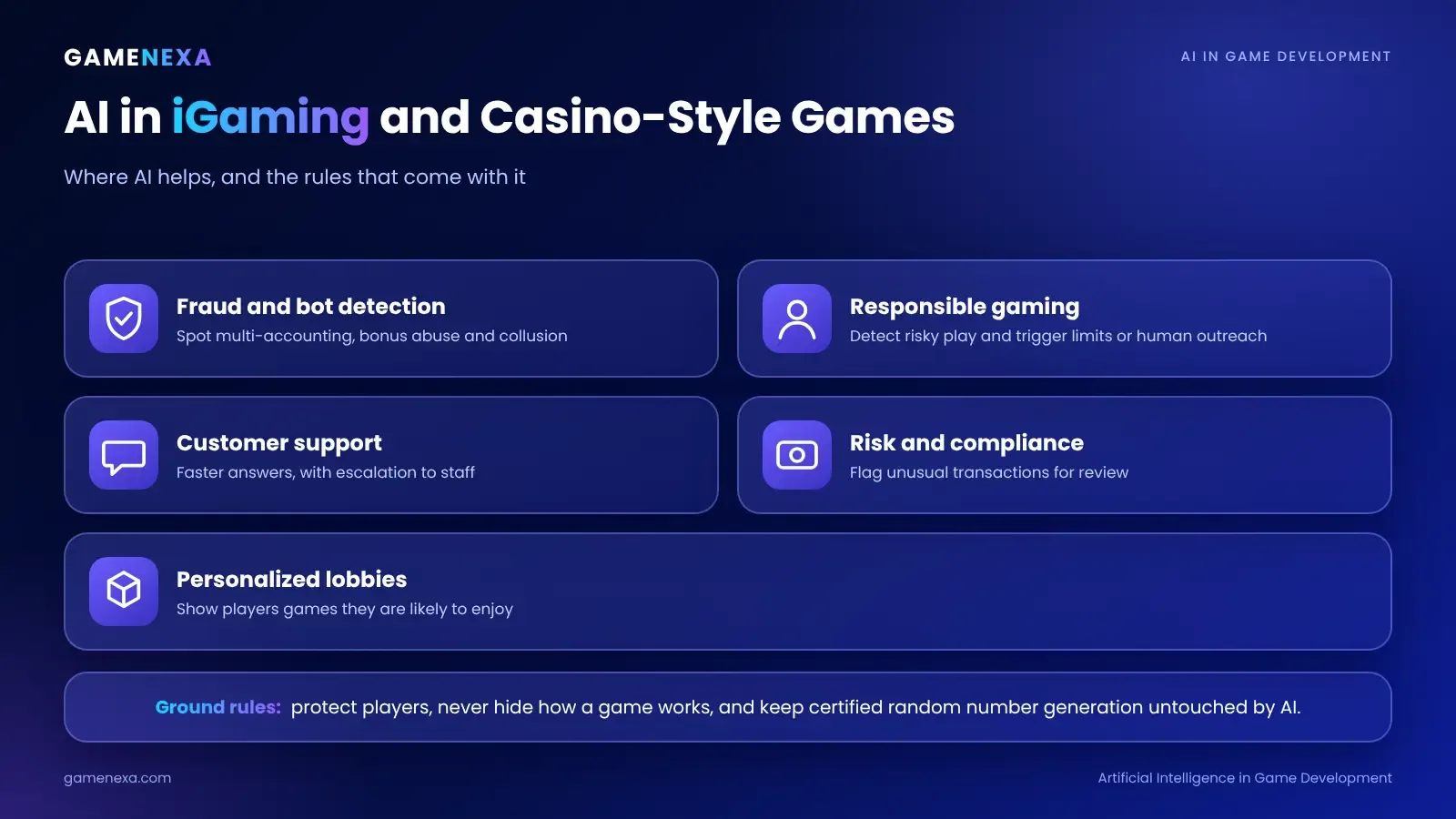
AI is also changing iGaming platforms, where trust and player protection matter even more.
Useful applications:
Fraud and bot detection. Spotting multi-accounting, bonus abuse, and collusion in games like poker.
Responsible gaming. Detecting signs of risky play and triggering reminders, limits, or human outreach.
Customer support. Faster answers to common questions, with escalation to staff.
Personalized lobbies. Showing players the games they're most likely to enjoy.
Risk and compliance monitoring. Flagging unusual transactions for review.
The rules are stricter here. Regulators expect operators to protect players, so AI must never be used to exploit vulnerable players or hide how a game works. Game results in regulated markets must also follow certified random number generation, and AI shouldn't change outcomes.
Learn more in our guides on how to build an iGaming platform from scratch and poker game development.
Artificial Intelligence in Game Development: The 2026 Numbers
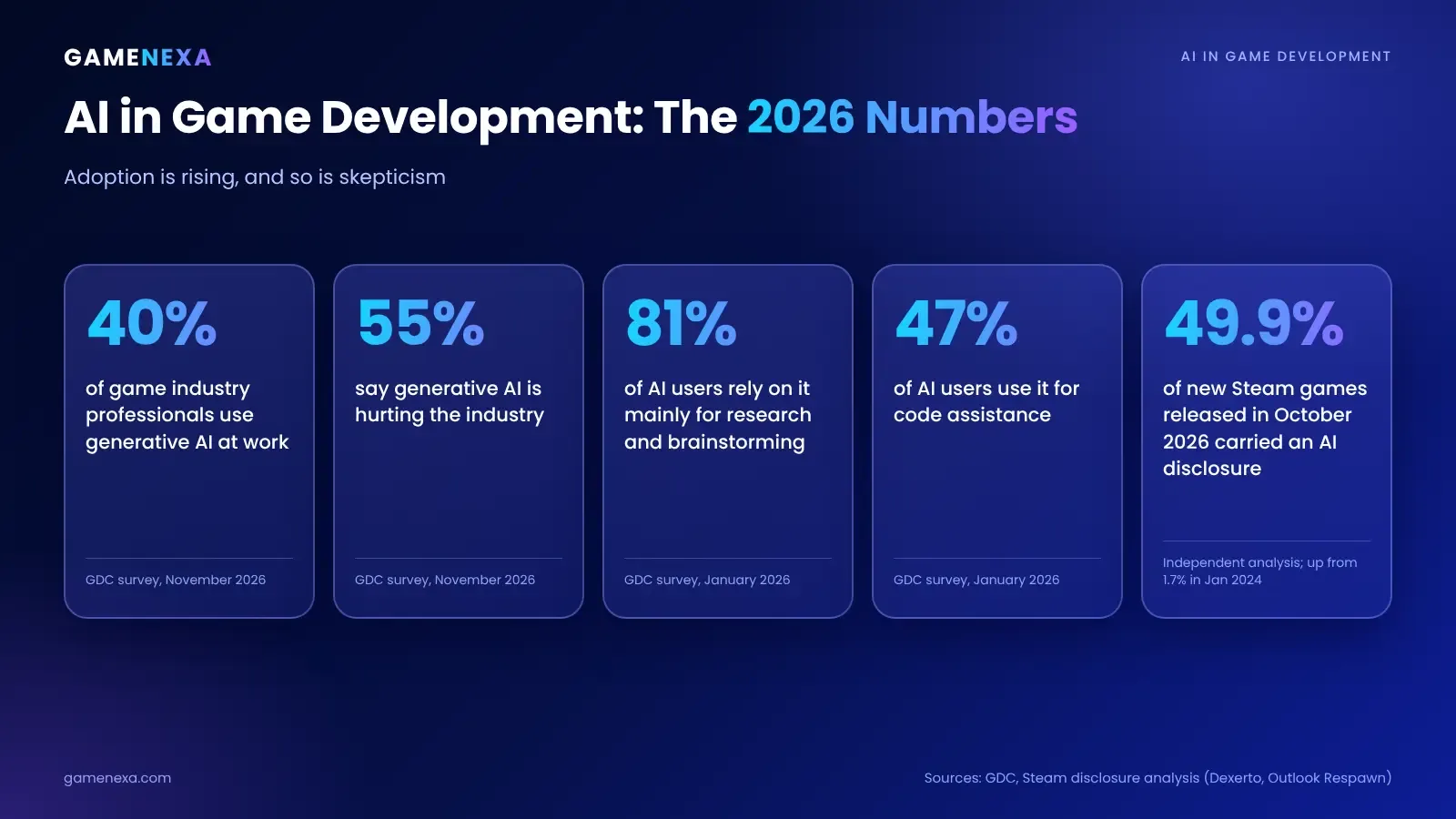
Here's what recent data shows about how the industry is really using AI.
40% of game industry professionals use generative AI at work, up from 36% in the previous GDC survey. The November 2026 report covers more than 2,600 professionals across 69 countries.
55% say generative AI is hurting the industry. In GDC's January 2026 survey, 52% said so, up from 30% a year earlier and 18% the year before.
Research and brainstorming lead. Among generative AI users in the January survey, 81% use it mainly for research and brainstorming, and 47% use it for code assistance.
Steam disclosures are rising fast. Valve has required developers to disclose AI-generated content since January 2024. One independent analysis of about 63,600 Steam releases found that 49.9% of games released in October 2026 carried an AI disclosure, up from 1.7% in January 2024.
Disclosed AI games score lower on average. The same analysis found an average positive review score of 77% for games that disclose AI use, compared with 83% for those that don't.
Two cautions apply. First, the Steam numbers measure what developers chose to disclose, not independently verified AI use. Valve's January 2026 update also excluded behind-the-scenes development tools from disclosure. Second, review scores show a link, not a cause.
What's the takeaway? AI use is rising quickly, but so is skepticism. Players and developers care how AI is used, not only whether it's used.
Benefits of Using AI in Game Development
Speed. Faster prototypes, drafts, and testing.
Scale. More content, more test coverage and more player support with the same team.
Cost savings on repetitive work. Less time on boilerplate, translations, and routine checks.
Better player insight. Analytics that spot problems and opportunities sooner.
More dynamic play. Smarter enemies, fairer matchmaking and adaptive difficulty.
Lower barriers for small teams. Indie studios can try ideas that used to need a bigger budget.
Risks and Challenges
Risk | What can go wrong | How to reduce it |
|---|---|---|
Copyright and licensing | AI output may resemble protected work, or tools may have unclear terms | Check each tool's terms and avoid shipping unreviewed AI assets |
Player backlash | Players may reject games they see as low-effort or AI-made | Be transparent and keep human craft front and center |
Quality | AI output can be generic, inconsistent or wrong | Treat it as a draft and have experts review |
Security and privacy | Sharing code or player data with outside tools can leak sensitive information | Set clear rules for what can be shared |
Platform rules | Stores like Steam require disclosure of certain AI-generated content | Read the policies and disclose accurately |
Safety | Open-ended AI chat can produce harmful responses | Add filters, limits, and moderation |
Team morale | Staff may fear job loss or feel pressure to use AI | Communicate clearly about goals and roles |
Cost | AI services can get expensive at scale | Measure cost per player before launch |
This is general information, not legal advice. Laws and platform policies are changing quickly, so check current rules for each market and store.
How to Add AI to Your Game Development Process
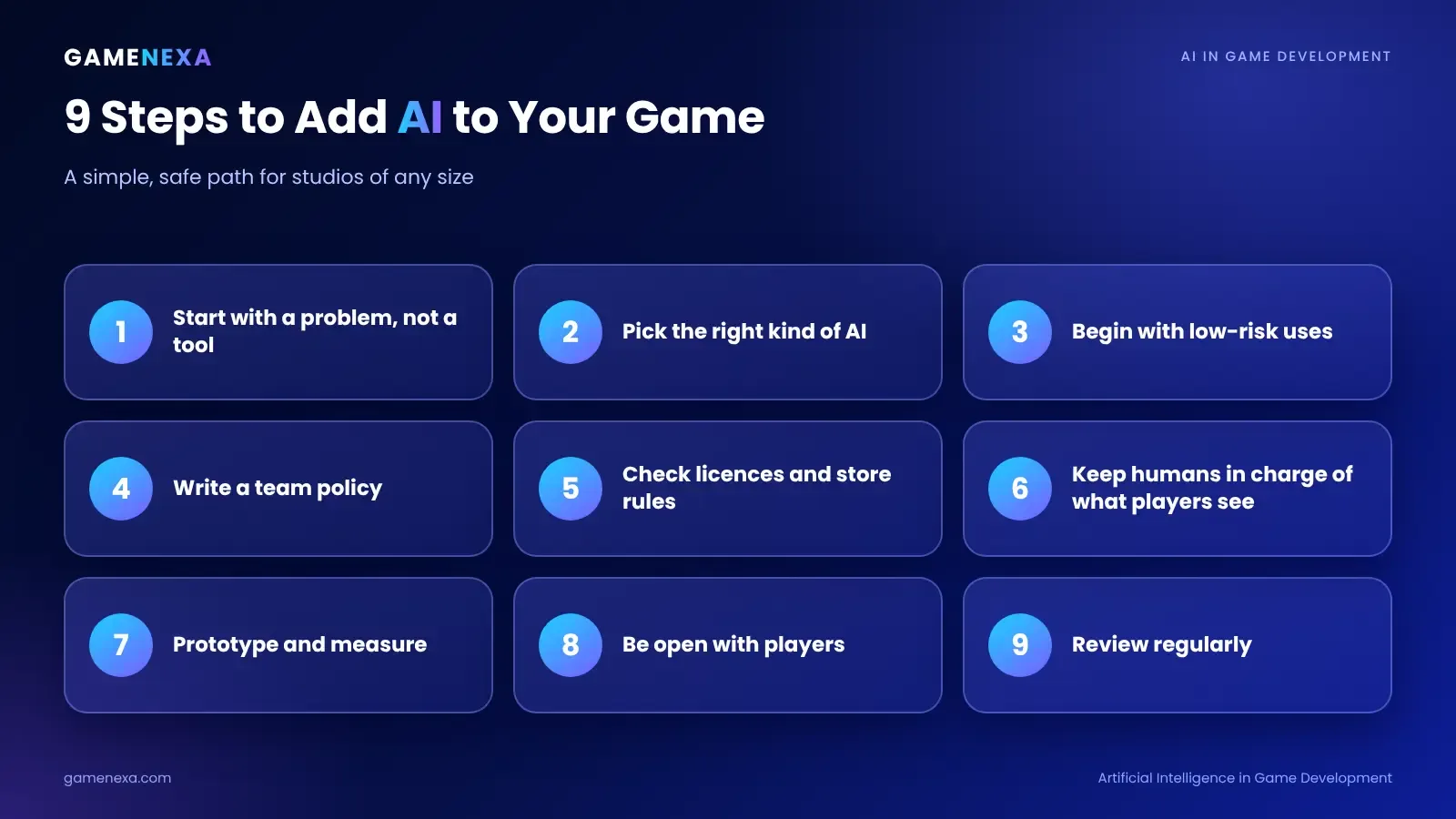
A simple, safe approach looks like this.
Start with a problem, not a tool. What's slow, expensive, or hard for your team today?
Pick the right kind of AI. Rules and algorithms often beat machine learning for simple behavior. Use generative AI only where it adds clear value.
Start with low-risk uses. Research, prototyping, testing, analytics, and internal tools carry less legal and player-facing risk than final art, voice, or story.
Write a team policy. Decide which tools are allowed, what data can be shared, and what needs human review.
Check licensing and platform rules. Read tool terms and store policies before you ship.
Keep humans in charge of what players see. Review, edit, and approve all player-facing content.
Prototype and measure. Track time saved, quality, and cost. Drop what doesn't help.
Be open with players where it matters. Honest disclosure builds trust.
Review regularly. The tools, laws, and player attitudes are all changing fast.
Best Practices for Responsible AI Use
Use AI to support your team, not to hide a lack of craft.
Keep a human in the loop for art, writing, voice, and anything legally sensitive.
Test for bias and safety, especially in chat and personalization features.
Protect player data. Collect only what you need and explain how you use it.
Keep records. Note which tools were used on which assets, in case you're asked later.
Respect creators. Pay and credit people fairly, and get consent for voice and likeness.
Trends in AI Game Development for 2027
More AI testing agents. Automated playtesting becomes a standard part of QA.
Smaller, on-device models. Running AI on the player's device cuts cost and delay for features like NPC chat.
Hybrid NPCs. Scripted stories with generative flavor.
Better creative tools. Tools that fit into artists' existing workflows instead of replacing them.
Clearer rules. More platforms and regulators asking for disclosure and consent.
Player-driven demand for authenticity. Games that show real human craft stand out.
AI-assisted live operations. Smarter events, offers, and support, with strong player-protection rules.
Common Mistakes
Chasing AI for its own sake. If a feature doesn't make the game better, skip it.
Shipping raw AI output. Unreviewed assets and text often look and feel generic.
Ignoring licences and disclosure rules. Problems here can get a game pulled or damage trust.
Underestimating running costs. Live AI features cost money every time a player uses them.
Skipping safety work. Open chat needs filters, limits, and monitoring.
Forgetting the team. Teams need clear guidance, training, and honest conversations about their roles.
Why Work With Gamenexa on AI-Powered Games
Gamenexa is a game development and iGaming software company with 11 years of experience, 60+ clients and 200+ projects delivered. We help clients decide where AI genuinely improves a game, and where a simpler approach works better.
What you get:
Honest advice. We tell you when AI helps and when it doesn't.
A clear plan. Scope, tools, and milestones agreed before the build.
Experience across game types. Casual, multiplayer, skill-based, and iGaming products.
Safety and compliance in mind. Player protection and platform rules planned from the start.
Support after launch. Monitoring, updates, and improvements.
Curious how AI fits into your project? Explore our game development services or contact our team. You can also read about our game development process and the best game development tools.
FAQ: Artificial Intelligence in Game Development
What is artificial intelligence in game development?
It's the use of software that can decide, learn, or generate content in games and in how games are made. It includes classic game AI, such as enemy behavior and pathfinding, and newer tools, such as generative AI for art, code, dialogue, and testing.
How is AI used in game development?
Teams use AI for NPC behavior, procedural content, art and animation support, coding help, automated testing, player analytics, personalization, anti-cheat, and chat moderation.
What is the difference between game AI and generative AI?
Game AI is a set of rules and algorithms that control characters and systems in a game. Generative AI creates new content, such as images, text or code, from patterns it learned in training data.
Will AI replace game developers?
It's unlikely to replace skilled developers soon, but it is changing some tasks. Many professionals worry about jobs and quality, which is why 55% of respondents in GDC's November 2026 survey said generative AI is hurting the industry. Teams that use AI to support skilled people usually get the best results.
Can AI make an entire game?
AI can generate parts of a game, such as code snippets, placeholder art, and levels. Building a complete, polished game still needs human design, testing, and direction.
Is AI-generated content allowed on Steam?
Yes, but Valve requires developers to disclose certain AI-generated content that players see. Valve's January 2026 update excluded behind-the-scenes development tools from disclosure. Check Steam's current policy before you release.
What are the best AI tools for game developers?
The best tool depends on the job. Code assistants help with scripting, image tools help with concept art, and testing frameworks such as Unity's ML-Agents help train automated players. Tools change fast, so test them on small tasks and check licence terms.
How do I use AI for NPCs?
Start with classic techniques such as behavior trees and navigation meshes. If you want conversational NPCs, use a hybrid approach with scripted story moments and generative replies, and add safety filters, cost limits, and a fallback for when the service is slow.
Is using AI in games ethical?
It depends on how it's used. Good practice includes respecting creators' rights, getting consent for voice and likeness, protecting player data, being transparent, and keeping humans responsible for the final product.
Conclusion
Artificial intelligence in game development isn't one thing. It's a toolbox, from the simple rules that steer enemies to generative tools that draft art and code. Used well, it speeds up work and makes games richer. Used carelessly, it creates legal trouble, weak content, and unhappy players.
Start small, keep skilled humans in charge of what players see, and measure the results. Be honest with your team and your players about how you use AI.
Ready to plan your game? Get in touch with Gamenexa and let's talk about where AI fits.